I built my first AI agent for a UX research task. Here's what happened.
.png)
Everyone is "doing AI agents" right now. But almost no vibe coder can tell you, in plain terms, what they built or whether it actually works.
At UX studio we've been exploring the topic of how to use AI in research effectively. We've shared how one of us learned to vibe code as a researcher, and a designer's journey into coding agents. This post goes one step further.
I wanted to know what it was like to build an agent for a specific UX research task rather than simply outsourcing menial tasks to a chatbot and doing the hands-on research myself. I documented everything, and my findings may surprise you.
In this blog post, I’ll share what I learned during that experiment: the roadblocks, the breakthroughs, and the reality of the process.
The problem
Most companies are testing AI agents, few are scaling them.
According to McKinsey's latest State of AI report, 62% of organizations are at least experimenting with AI agents. At the same time, nearly two-thirds of respondents say their organizations have not yet begun scaling AI across the enterprise.
This is what I was seeing in conversations too: curiosity about agents (and AI in general) everywhere, but very little clarity on what anyone had actually built, how long it took, or whether it held up outside a demo.
Inconsistent terminology is common
To know what you’re building, you need a shared vocabulary. However, people use terms like *Agent*, *AI*, *skill*, *chatbot*, interchangeably to mean different things, and sometimes enterprises are guilty of it as well. The Gemini chatbot quietly editing your live Google Doc has wandered into agent territory without letting you know. Half of every daily AI conversation is two people using the same word for different ideas.
IBM defines agentic AI as a system that can accomplish a specific goal with limited supervision. AI agents that mimic human decision-making, plan steps, use tools, and coordinate subtasks. That definition helps, but it doesn't tell you where your task sits on the spectrum of autonomy.
As the AI landscape rapidly evolves, the boundaries between different modalities are increasingly blurring, making them much harder to tell apart.
The solution
Start with a shared terminology
I suggest following this general guideline to help you picture AI as a spectrum, not strict categories:
- A prompt. One instruction, one answer. You do all the orchestration. "Summarize this transcript."
- A chatbot. Conversational, but it doesn't act. Every output waits for you.
- A chatbot with skills. Predefined capabilities: a tagging skill, access to your repository, a structured output template. You still trigger each step, but each step is more consistent.
- AI workflows. Multiple steps (in terms of skills or taken actions), adapt to unstructured data and make context-driven decisions.
- An agent. It decides for itself which steps to take, in what order, with which tools and skills, and loops until it judges the job done. Possible components of agents are (autonomy), planning, use of tools and a memory.
One useful framing I've been reading is Anthropic's guide on building effective agents: match the architecture to the task, and add autonomy only when the path is genuinely unpredictable. I kept that in mind while building, maybe not as a rule for everyone, but as a lens for my own project.
Build for a specific task
I chose something with a well defined outcome: mapping the flows of an existing product, which means taking screenshots of each screen and wiring them into a visual flow in Miro. It's the kind of thing you do for competitor analysis, or to document a legacy product nobody ever drew up.
I built it in Cursor and connected the Miro API. I chose Cursor for a few reasons: at the time, I didn't have a professional Claude account, but I’d also heard great things about Cursor as an IDE and AI agent-building platform. Its access to frontier LLM models, combined with its built-in capabilities, made it the right fit for this project.
My opening prompt was almost embarrassingly plain, something close to: "I'd love to build an agent that maps out the flows of existing products: take screenshots, wire them into visual flows in Miro."
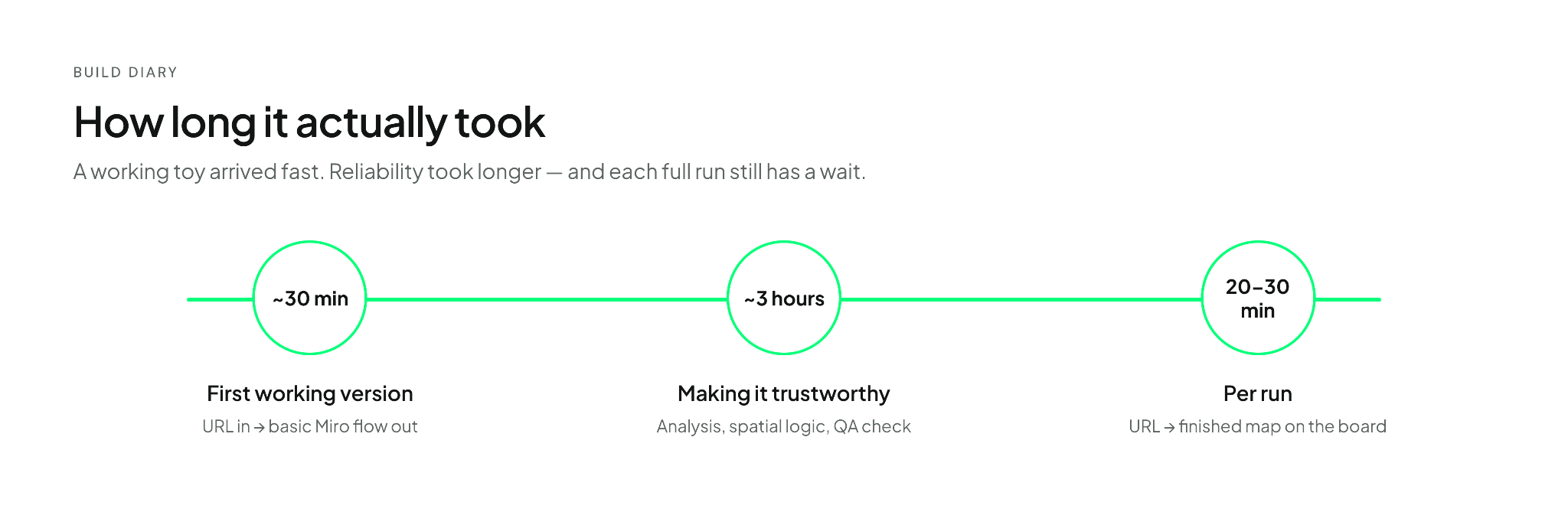
A basic version took about 30 minutes. Give it a URL, get a flow mapped onto a board. That was it. The barrier to a basic working agent is much lower than the noise around it suggests. If you've been picturing weeks of setup, recalibrate.
You can check out how the results look like here.
Note that you don't need Cursor to start, and you don't need to write much code. The tools sit on a range from no-code to high-code:
- No-code and visual: n8n, Gemini's Agent Studio, Microsoft Copilot Studio. Good for wiring steps together and seeing the flow without touching a terminal.
- Low-code and chat-driven: Cursor, Claude Code. You describe what you want and review what they build. This is where I worked.
- High-code frameworks: LangGraph, AutoGen, Google ADK. More control, more setup, worth it once you know exactly what you're orchestrating.
One thing worth watching across all of them is the Model Context Protocol (MCP) — an emerging standard for connecting models to tools and data. Anthropic originated it; it's now vendor-neutral and increasingly the common plug between these levels. If you're exploring agents seriously, understanding MCP early saves confusion later.
Refine for trustworthiness
Thirty minutes gets you a toy or a first MVP. The real time went into making it behave like something I'd rely on. In over roughly three more hours I added:
- An analysis pass that decides which user flows are worth capturing, instead of grabbing screens blindly and asks which flow to capture.
- Spatial-awareness logic so new content doesn't land on top of whatever is already on the board.
- Friendlier touches: a welcome message, and more options for click-path markers on the screenshots.
- Dual mode: start a fresh Miro board, or update an existing one.
- An automated quality check that verifies marker placement and spacing before it calls the job done.
- A “fast” agent mode, which maps out only flows with four pages or less, which was important for me to test the functionality with shortening the waiting cost.
A lot of those three hours was waiting time. Which brings me to the 'parts the demos skip', the unpolished, often tedious reality of debugging and latency that those slick marketing videos never show.
Account for hallucinations
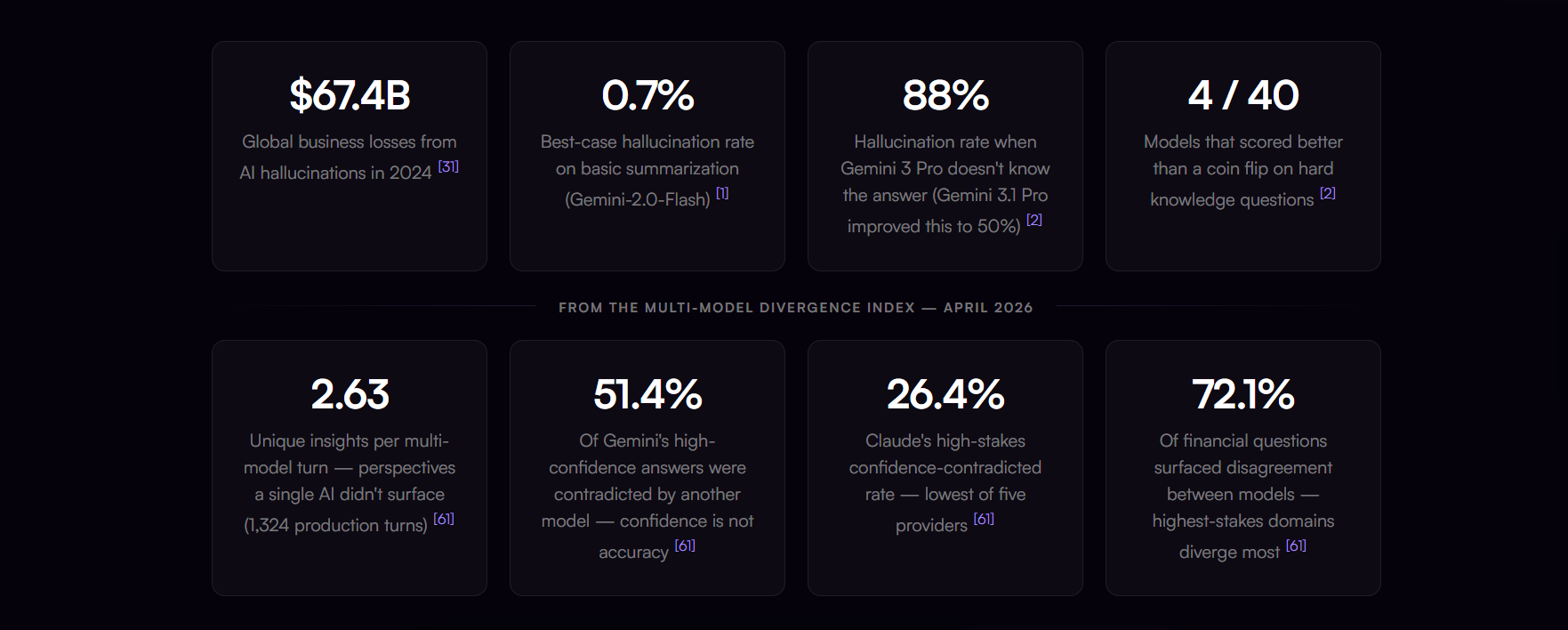
Here's the uncomfortable bit most write-ups quietly leave out. I built a working agent, and I still can't give you clean numbers on the questions that matter most.
How much does it hallucinate? I added a quality check because I could feel the risk of misplaced markers and invented structure. But building a guard against a problem is not the same as measuring it. Which AI model would do this best? From the inside, I couldn't tell you. The benchmark landscape is a maze of metrics built for other people's tasks.
Instead of relying on generic leaderboards, evaluate your agent build with rigor by checking these specific metrics for a task like mine:
- Hallucination and factuality on tasks.
- Accuracy against a small set of examples where you already know the right answer.
- Cost and latency per run, because a "smarter" AI model you can't afford to run isn't smarter for you.
Public leaderboards like llm-stats.com help you triangulate, but they won't answer the only question you care about: is this reliable enough for my task? For that, you still need a few of your own test cases.
It's roughly where the whole field sits right now: we can build these things faster than we can evaluate them.
Don't skip the GDPR part
I built an agent that doesn't touch sensitive data at all with no participant data involved.
If you're building agents around research data, GDPR needs to be part of the design, not an afterthought. A few non-negotiables, in line with how we handle participant data:
- Never paste personal or sensitive data into public AI tools. No names, emails, phone numbers, or anything identifying — most consumer-facing tools aren't set up with the data terms research needs.
- Pseudonymize, and use participant IDs. Swap names for IDs and keep the key separate.
- Note: this reduces risk, but it doesn't take the data out of GDPR's scope, pseudonymized data is still personal data. True anonymization (where re-identification isn't possible, even by you) is the only thing that fully exits GDPR, and it's a higher bar than most research data meets.
- Mind the memory and logs. An agent that retains context is also retaining data. Know what it keeps, and for how long.
- Check where the data lives and how it gets there. Data residency matters, but so does the transfer mechanism: moving EU personal data outside the EU/EEA needs a specific legal basis (like Standard Contractual Clauses), not just a vendor's general terms.
- Keep a human in the loop on anything sensitive. Same rule as the rest of research: review before you rely.
Build it responsibly and if you're making real compliance calls rather than just being sensibly cautious, looping in whoever handles privacy/legal at your org is worth it.
The takeaway
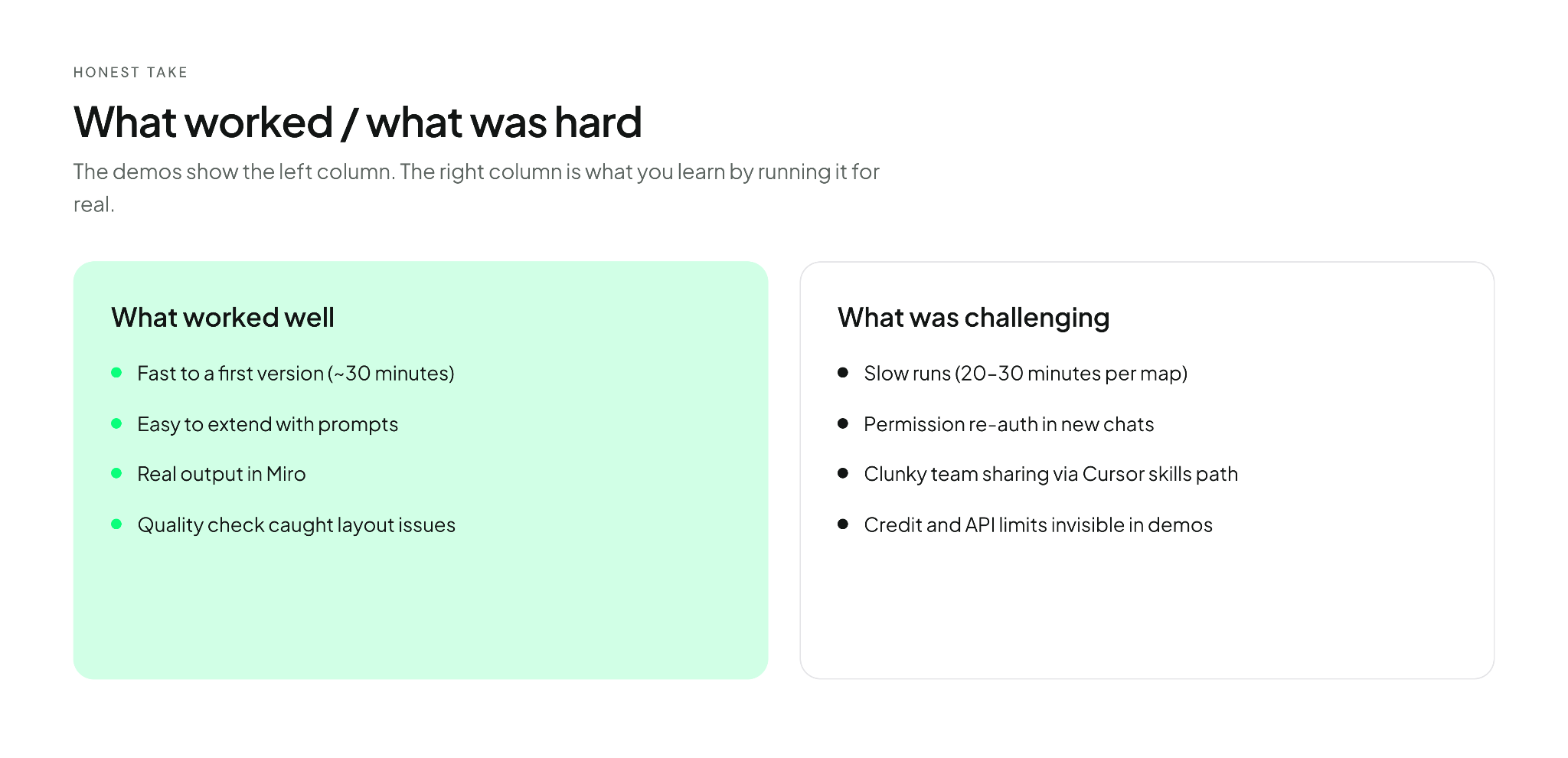
What worked well
- It's faster to start than I expected. A working first version took about thirty minutes — lower than I assumed going in, and enough to change how I think about the entry barrier to building an agent—both the technical skills required and the sheer intimidation of the setup.
- It's easy to extend with prompts. Each improvement (the flow analysis, spatial logic, quality checks) came from describing what I wanted next in conversation, not from rewriting a specilisation or touching code myself.
- The output lives where research work already happens. Screenshots land on a Miro board you can share, annotate, and drop into a readout. That matters more than getting a tidy answer in a chat window.
- The quality check caught real issues early. Misplaced markers and overlapping frames showed up before I opened the board, which saved cleanup time — even though I still can't quantify how often the agent gets things wrong.
What was challenging
- It's slow when you're evaluating it. From URL to finished map is often 20 to 30 minutes of the agent working quietly. Fine when you're doing something else; less fine when you're trying to assess it and stuck watching.
- It needs “babysitting”. While it runs, you may have to grant permissions in the chat. I left that on deliberately, since I'm still experimenting and I'd rather stay in the loop. When I activated the agent in a new chat window I often had to reauthorize Miro and reselect the org and team.
- Sharing it with teammates is clunky. To hand someone a Cursor agent, they need Cursor and the right `/.cursor/skills/` path. Compare that to one "share" button on a Gemini Gem. An internal GitHub repository would be cleaner, but that's infrastructure you have to set up first.
- Cost and limits lurk underneath. Credits in Cursor, the underlying model, the API key to Miro, each has a ceiling. None of it shows up in a five-minute demo, and all of it shapes whether the thing is usable day-to-day.
What I'm still sitting with
Yes, the build was worth it, but not in the way I expected. The lesson wasn't "agents are amazing" or "agents are overhyped." It was a clearer picture of what the autonomy of this agent actually bought me for this specific task, and what it cost.
I'm still working through a few questions:
- Which parts of those three hours were genuinely necessary, and which were me over-engineering?
- How about an agent which can also map prototype flows, instead of only existing Webflows?
- If I ran this twenty times on twenty products, what would I measure and what failure rate would I accept?
At UX studio, we're continuing to test skills and agents on our own research workflows (mapping flows, drafting screeners, summarizing sessions) and sharing what holds up and what doesn't. If you're working through similar questions on a smaller team, we would be delighted to connect and exchange ideas.
What's next
The takeaway, for me, is smaller and more useful than the hype: build something, watch the slow parts, measure what you can, and stay honest about what you still can't.
In our work, we keep testing: more skills, workflows and agents, and take a closer look at where each genuinely saves time. On the blog, we'll keep sharing what holds up and what doesn't.
Subscribe to get a monthly summary of our latest posts.
What to read next:
A designer's journey into coding agents and how it reshaped the way we work
Credits
This blog post was written by Miriam Reichert, UX researcher
Editing by Dr. Székelyhidi Johanna, marketing manager.
References
- McKinsey & Company — The state of AI
- IBM — What is agentic AI?
- Anthropic — Building effective agents
- LLM Stats — llm-stats.com
- Model Context Protocol — modelcontextprotocol.io
- UX studio blog — AI in ux research